Modern businesses gain efficiency by digitising their operations, including signatures. A Digital Signature Certificate (DSC) can make B2B businesses and operations on government portals seamless.
Valid digital identities of a business are the basis of a digital signature certificate. A DSC can be the electronic equivalent of a physical ID card or a handwritten signature for all corporate filings and legal agreements.
However, a digital signature certificate is not valid forever. It possesses a set lifespan of one, two, or three years and faces active revocation at any time.
Let’s understand the technical and practical methods to track DSC status, ensuring the legal compliance of a business. Keeping the validity period in mind can help businesses avoid last-minute portal errors from impacting them.
With proactive management of DSC, businesses can gain uninterrupted access to the Ministry of Corporate Affairs (MCA), Goods and Services Tax (GST), and Income Tax portals.
Decoding Certificate Validity vs. Revocation
It is important to understand the difference between the expiry and revocation of a digital signature certificate for better compliance planning. Here are the main points of difference between DSC validity and revocation.
DSC Expiry
DSC expiry means the natural end of the legal validity period assigned by the Certifying Authority (CA) at the time of issuance.
DSC Revocation
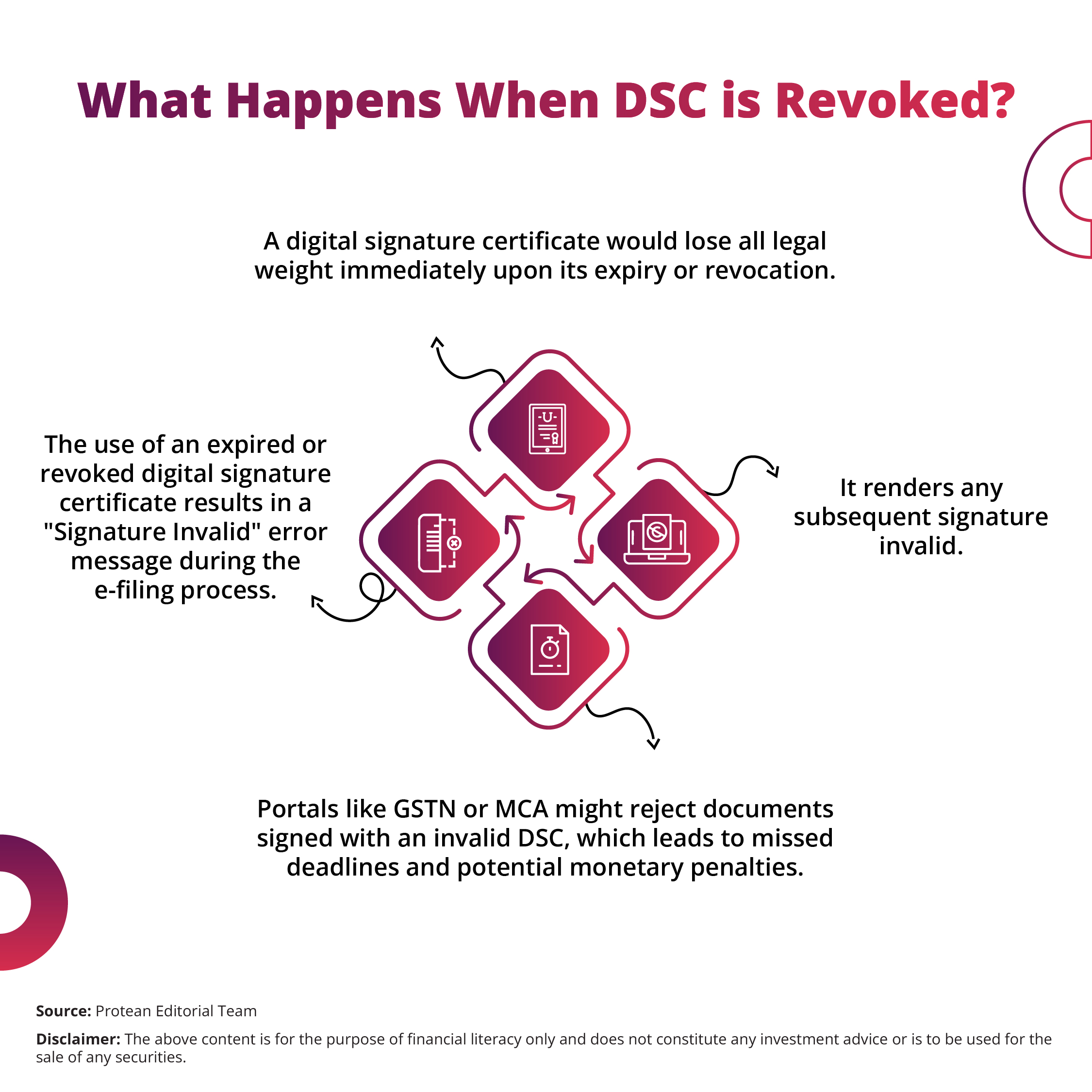
DSC revocation is a manual invalidation of the DSC before its scheduled expiry date. Generally, this can happen due to a security breach or change in user details. Here is what happens when a DSC is revoked. A DSC could also be revoked if the subscriber reports a lost or compromised USB token.
Methods to Verify DSC Expiry and Revocation Status
Businesses can ensure the token functions correctly by tracking their DSC expiry and/or revocation. Here are the main technical steps required for effective verification of a digital signature.
- Insert the USB token into the computer and open the specific token manager software. Most brands like ePass, mToken, or Watchdata provide a dashboard that displays the DSC validity period clearly under the 'Certificate' tab.
- View the certificate properties directly within the Windows operating system. One opens the 'Run' dialogue box, types 'certmgr.msc', and navigates to the 'Personal' folder to find the expiration date column.
- Inspect the 'General' tab of the certificate dialogue box by double-clicking the DSC file. This tab explicitly shows the 'Valid from' and 'Valid to' dates, which provides a quick snapshot of the remaining lifespan.
- Check the status via the official website of the issuing Certifying Authority like Protean eGov Technologies. Generally, CAs provide a 'Search' or 'Track' feature. Here, a user can enter the certificate serial number to confirm its current standing.
- Review the Certificate Revocation List (CRL) for the most accurate information on manually invalidated certificates. The 'Details' tab of your digital signature certificate contains a 'CRL Distribution Points' field with a URL to the latest list.
- Use the Online Certificate Status Protocol (OCSP) for real-time verification. Many modern PDF readers and portals use OCSP to query the CA server instantly and determine if the DSC remains in a 'Good' or 'Revoked' state.
- Analyse the 'Details' tab for the 'Serial Number' and cross-reference it with the records in the CA repository. Each digital signature certificate has a unique hexadecimal serial number allowing for precise identification.
- Test the DSC on a portal-specific utility like the MCA emSigner or the GST portal registration page. These platforms perform an automated check against the CA's database before they allow the signature to proceed.
- Monitor the registered email address and mobile number for automated renewal alerts. Licensed authorities like Protean eGov Technologies send reminders a few days before the DSC reaches its expiry date.
Conclusion
Proactive digital signature certificate lifecycle management is very important for B2B businesses operating in a digital-first environment. With a valid DSC, the legal integrity of documents can be ensured.
DSC validity can also facilitate the seamless submission of statutory returns. Business owners need to perform a status check on their current tokens today to avoid unexpected disruptions.
Is your audit indicating an upcoming expiration? Renew digital signature certificate through an authorised provider like Protean eGov Technologies today. Timely renewal and regular status checks can protect the organisation from portal downtime. It can also ensure that every digital signature carries the full force of the law.
Frequently Asked Questions
Q1: How does one check if a DSC is revoked?
The user can verify the revocation status by accessing the Certificate Revocation List (CRL) URL found in the certificate details or by using an OCSP verification tool.
Q2: What happens if a digital signature certificate expires during a transaction?
The portal would reject the signature immediately, and the transaction fails. The user needs to obtain a new DSC and register it on the portal to resume operations.
Q3: Can a revoked digital signature be reactivated?
No. Once a Certifying Authority revokes a digital signature certificate, it becomes permanently invalid. The subscriber needs to apply for a fresh certificate through a licensed CA.
Q4: Is it possible to check the DSC status without the USB token?
One can check the status without the token if the serial number or a copy of the public certificate is available to query the Certifying Authority's online database.