For modern businesses, digitisation has become the core of their internal operations and external transactions.
For B2B transactions, the legal and financial weight of a contract is entirely dependent on its non-repudiation and integrity. A digital signature can be a tamper-evident seal. However, accidental modifications could jeopardise (make void) an agreement, although standard digital signatures often permit authorised annotations.
A virtual signature can no doubt provide higher convenience. However, its validity depends on the core signed content remaining unaltered, even though the file itself can accommodate permitted post-signing actions. Whenever a document undergoes an unauthorised change to its core content after the signing process, the underlying cryptographic bond breaks. Professionals need to be aware of these dynamics to maintain the sanctity of their electronic records.
Here is how the cryptographic mechanism works. Let’s learn about the structural PDF saving methods, and legal implications triggered the moment a signed PDF is altered.
The Process of PDF Tamper Detection
At the core of a digital signature’s security is a process called hashing. Meaning, a user applies a signature. Then, the software calculates a unique mathematical value, known as a hash, for a specific byte range of the document that excludes the signature itself.
Here, every single character, space, and metadata bit contributes to this final value. So, if a user accidentally deletes a comma or adds a space, the hash of the modified file will no longer match the original encrypted hash.
PDF readers can perform a comparison every time the file opens. Any discrepancy would result in a warning to the viewer that the document was modified after the signature was applied. Thus, with the hash security mechanism, the digital signature can effectively indicate a document's integrity.
Decoding Signature Invalidation Types
The status of a signature can provide a clear indication of the document's health.
Total Invalidation and Identity Failure
A status indicating that "Signature is Invalid" would occur when the core content of the document has undergone any change, however minor. Meaning, the cryptographic hash check has failed completely.
In this case, the viewer cannot guarantee that the content you see is the same content the signer approved. Generally, this happens if a user attempts to edit the text or replace pages within the PDF. Such a failure would render the digital signature legally useless for formal B2B agreements. It could signal a breach in the chain of trust that every enterprise-grade transaction requires.
The "Valid with Changes" Warning
In some cases, the software could display a message stating the "Signature is Valid, but has been modified."
This could happen when the changes are additive rather than destructive. Here is a case-based example to understand this better.
A user might add an archival timestamp or an invisible metadata tag. Here, the original content has remained intact within the file structure. However, the software notes that the file is not exactly as it was.
So, for a virtual signature, this state would still require caution. In such cases, parties need to verify whether the changes were authorised or if they hide malicious alterations.
Full Rewrites vs. Incremental Saves
Whether or not the digital signature would survive a modification depends on the way a computer saves the file. Here are the major points of difference between them.
- Why "Save As" Can Destroy the Signature
A user selecting "Save As" in many applications, would rebuild the entire file structure from scratch. This process would reorder the internal data blocks, which changes the byte-level map of the document. So, even if the text looks identical, the hash would change, and the signature would immediately break.
- How Incremental Updates Preserve History
Robust PDF software would use incremental saving to add data to the end of the file. This method would leave the original signed byte range untouched.
- Original Byte Range Protection
The digital signature can only cover a specific range of bytes. As long as those bytes remain in their original sequence, the signature stays valid.
- Appending Data Logic
Incremental saves append new information, such as a new signature or a form field entry, as a separate layer.
- Verification of Previous Versions
Users adopt modern PDF readers to view the "signed version" of the document. This feature can effectively prove what the document looked like at the exact moment the signature was applied.
- Structural Integrity
The robustness of the digital signature would remain only if the software respects the incremental saving protocol and avoids a full file rewrite
Managing Permitted Post-Signature Changes
Not every change to a signed PDF is an accident or a violation. With the PDF specification, certain "permitted changes" can be done if the signer enables them during the initial process.
Modification Detection and Prevention (MDP)
With these settings, a signer is permitted form filling, annotations, or the addition of subsequent signatures.
For instance, a contract might require signatures from three different parties. Each party adds their virtual signature as an incremental change. Here, if the first signer permits "filling in forms and signing," the document remains valid after the second and third persons sign. However, if a user attempts to edit the base contract text, the MDP settings will trigger a total invalidation.
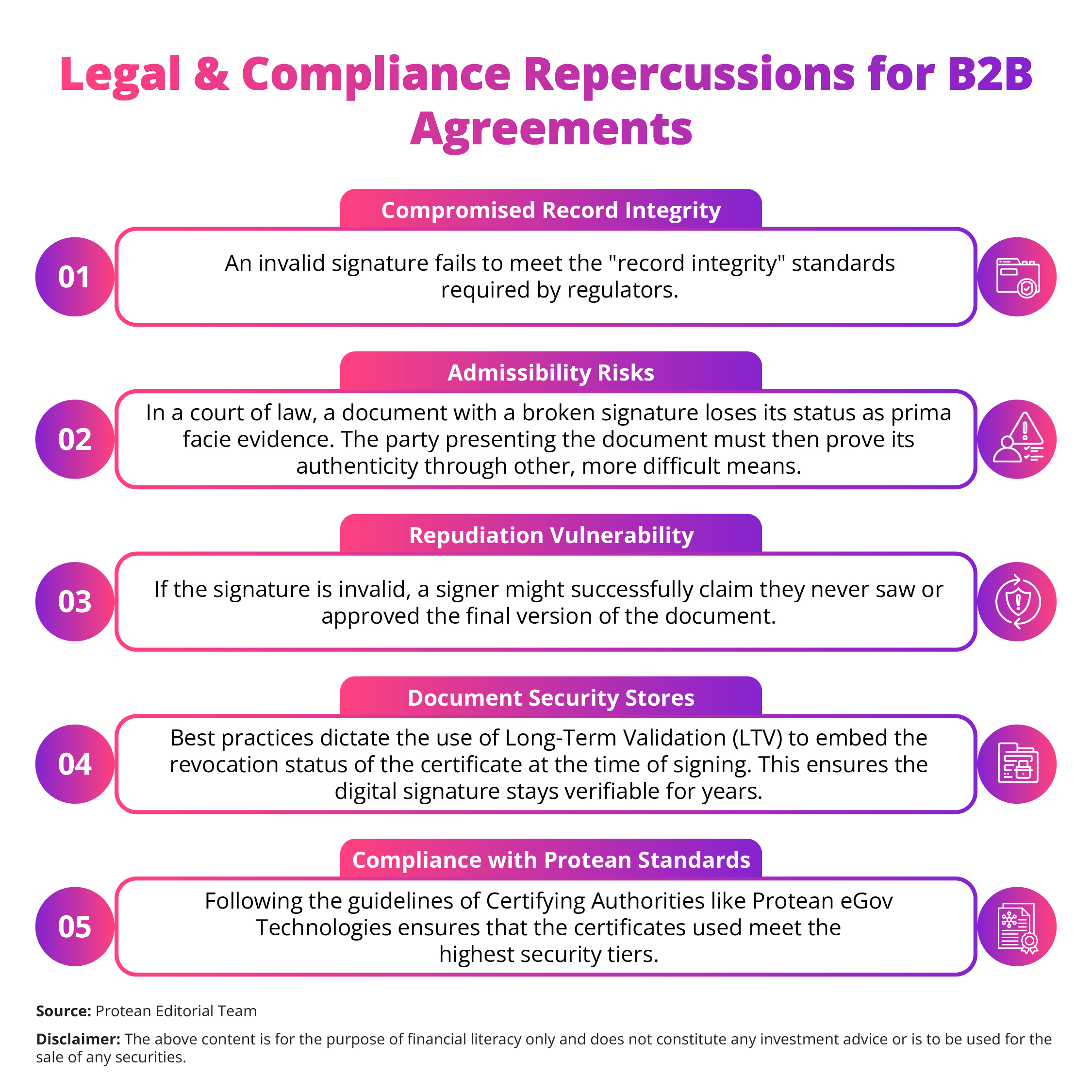
Legal and Compliance Repercussions for B2B Agreements
In a legal setting, an invalidated digital signature could lead to heavy consequences. Here’re the points highlighting the risks involved for modern enterprises.
The Takeaway
The integrity of a signed PDF can be well-protected by cryptographic science. A digital signature could be a definitive answer to whether a document was altered.
Accidental changes, while common, could pose a huge risk to the legal standing of B2B contracts. Users need to avoid the "Save As" function on signed documents and instead depend on incremental saves.
Secure your transactions by verifying the signature status every time a file is received. Protect your business from the silent threat of document corruption today.