A digital signature is much more than a fancy e-stamp. It is a cryptographic assurance that a document has come from a particular signer and has not been altered.
In India, digital signatures and Aadhaar-based eSign services are widely used across banking, securities, government filings and enterprise workflows. A digital signature can efficiently replace paper signatures and speed up business processes. However, it is of utmost importance to prove its integrity and admissibility of the document.
Here is the importance of why verification matters. Let us learn how it is backed by Indian legal frameworks, and understand the practical steps for digital signature verification online.
Why is verification required?
Signing can create a tamper-evident seal and a certificate chain that links the signer to a cryptographic key. However, certificates expire after a certain period, may be revoked, or a file may be changed after signing. Thus, digital signature verification becomes important.
Organisations and regulators insist on verification because it converts a digital signature from a technical artifact into legally meaningful evidence. The Information Technology Act and rules, plus national PKI guidelines, set the framework for trusting digital signatures in India.
Why is Digital Signature Verification Non-Negotiable?
Digital signature verification is non-negotiable for the following three reasons:
Legal admissibility and compliance
The IT Act, and rules under MeitY and the Controller of Certifying Authorities (CCA), establish that digital signatures issued by licensed Certifying Authorities (CAs) are legally recognised, but only when their validity and chain can be demonstrated. Various financial institutions like banks, stock exchanges accept filings signed digitally. This is only if the authentication/verification requirements are met.
Fraud and tamper protection
Unlike scanned images of signatures, cryptographic signatures can detect even a one-byte change. With digital signature verification online, businesses can efficiently expose tampering attempts and protect downstream users (auditors, courts, counterparties) from relying on manipulated files.
Operational and audit trails
Modern eSign platforms (including Aadhaar-based eSign providers) create auditable logs. They are technologically embedded to answer questions like these:
- Who signed the document?
- When was it signed? (timestamp)
- How were they authenticated? (OTP/biometric)
- Which certificate was used?
Digital signature verification online can tie the document to that trail. This is essential for compliance in finance, NPS/pension workflows, and corporate filings.
How to Perform Digital Signature Verification Online
Digital signature verification online can be simple if you know the following steps and tools:
Use a trusted viewer or verification service
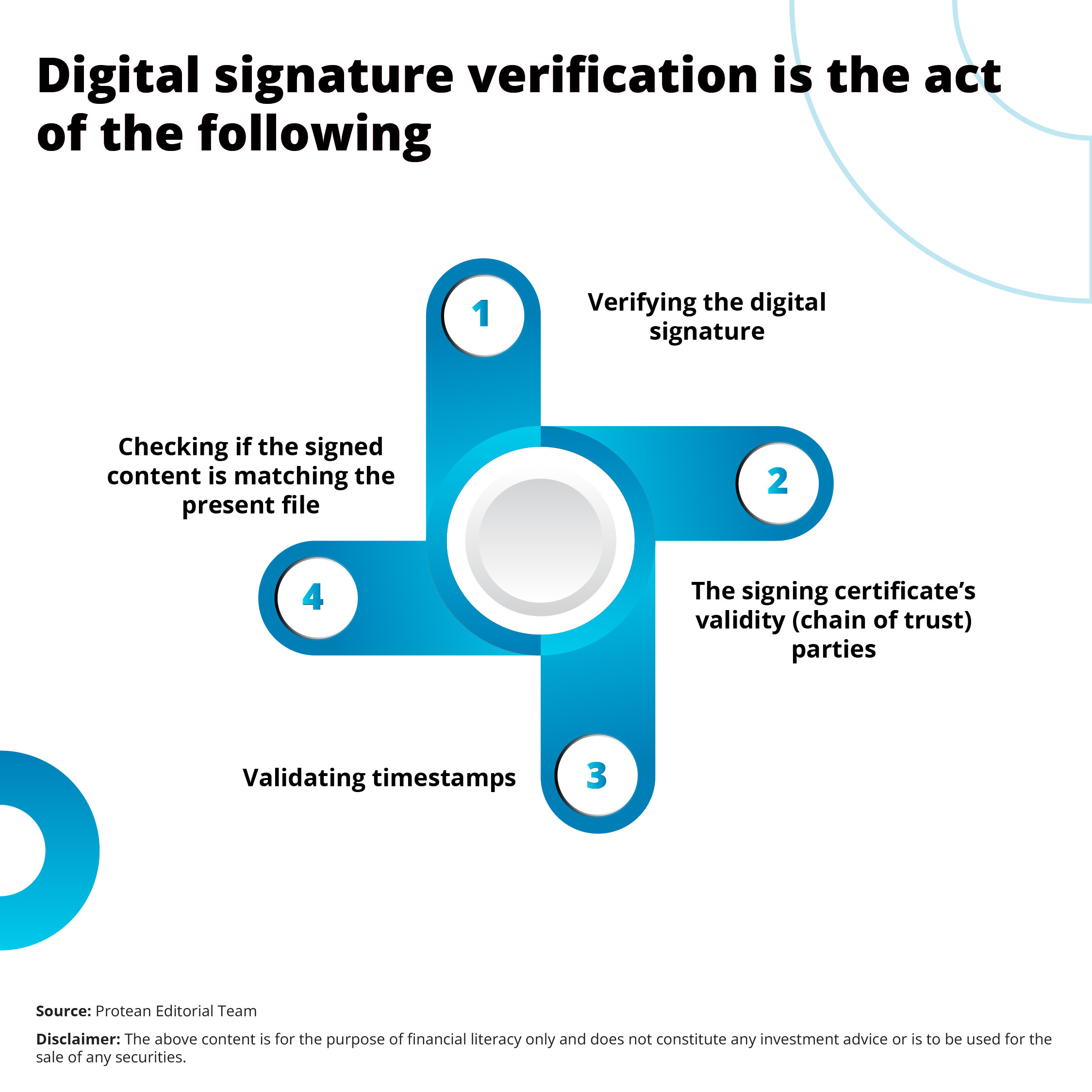
For PDFs, Adobe Reader/Acrobat offers built-in signature validation that checks certificate chains, timestamps, and revocation status. Many Certifying Authorities and CAs (including licensed ESPs) also provide web portals or APIs for verification. Businesses can open the signed file and look for signature panels or validation indicators.
Check certificate chain and trust anchor
Verification confirms the signer’s certificate chains up to a trusted root (the CCA root in India). If the root or an intermediary CA is not trusted by your viewer, you can import the CCA root or consult the Certifying Authority’s verification endpoint (most publish certificate information). Guidelines and CCA policies describe acceptable certificate standards (X.509 v3).
Confirm timestamp and signature time
A valid signature must have been made while the certificate was active. If the signature includes a trusted timestamp (RFC-compliant), verification can show the signing time even after certificate expiry. This is vital for legal contests and long-term archival.
Query revocation status
Businesses can check CRL (Certificate Revocation List) or OCSP (Online Certificate Status Protocol) responses during verification. Many online verification tools can perform this automatically. So, if a certificate is showing ‘revoked,’ businesses should treat the signature as invalid.
Match the signed content
It is important to ensure that the verification tool confirms the document content matches what was signed. Viewers show “document modified” or “signature invalid” if there’s any mismatch. If you need an independent check, you can download the signed package and verify using the CA’s web verification or an API (useful for batch processes).
Record verification evidence
You can save the validation report, signature properties, and any timestamps/OCSP responses. These artefacts form an audit trail acceptable to auditors and courts in case of dispute.
Here are a few quick tools and tips for digital signature verification:
- For one-off PDFs: use Adobe Reader’s Validate Signatures feature.
- For enterprise/bulk: integrate with a licensed eSign provider (Protean eGov Technologies Ltd.) that exposes verification APIs and audit logs.
Conclusion
To conclude, digital signature verification turns cryptography into actionable trust. In India, legal frameworks (IT Act, CCA rules, SEBI circulars) recognise digital signatures when certificate validity and unaltered content can be verified.
Modern businesses can make digital signature verification a built-in step in any signing workflow. It is the difference between a clickable signature and a legally defensible one.
Frequently Asked Questions
Q1: Is Aadhaar eSign legally equivalent to a digital signature?
A: Aadhaar-based eSign is an authorised electronic signature method in India when delivered by empanelled Certifying Authorities and ASPs. It can create a legally valid digital signature if verification steps (certificate chain, timestamp) check out.
Q2: Can I verify a digital signature after the signer’s certificate has expired?
A: Yes, if a trusted timestamp was applied at signing or the certificate was valid at the signing time, verification can still establish authenticity. Without timestamping, expired certificates can complicate proof.
Q3: Which public authorities set the rules for digital signatures in India?
A: MeitY and the Controller of Certifying Authorities (CCA) regulate Certifying Authorities. The IT Act and associated rules define legal standing. SEBI and other regulators may issue domain-specific guidance (e.g., stock exchange filings)